
Hersheypark
Hershey Entertainment and Resorts CompanyTravel & Local
4.71.47K Reviews
- Version
- 3.1.46
- Installs
- 500.00K
- Age Rating
- Everyone
Screenshots
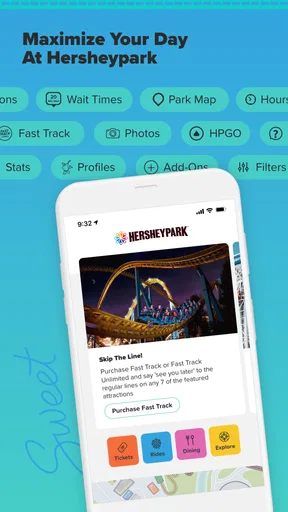
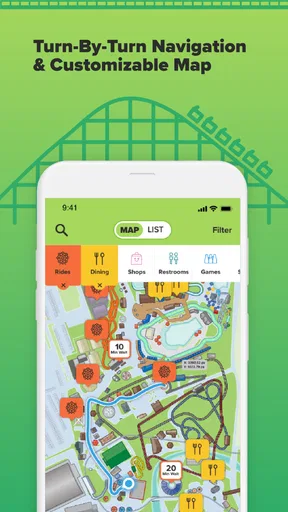
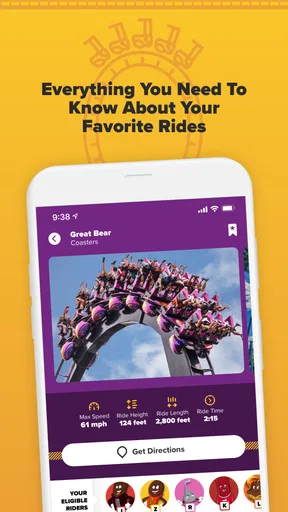

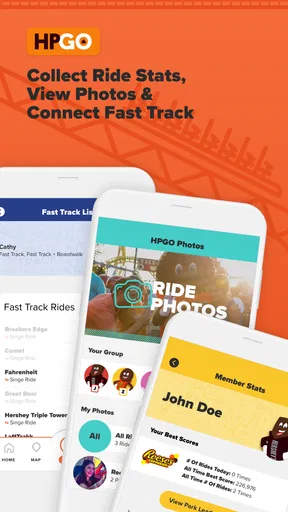
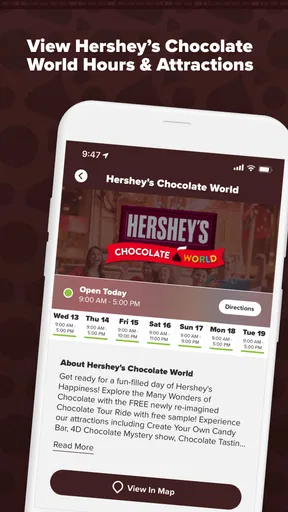
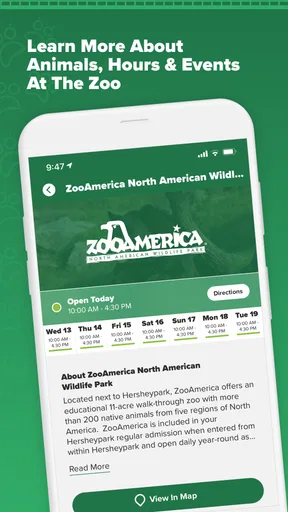
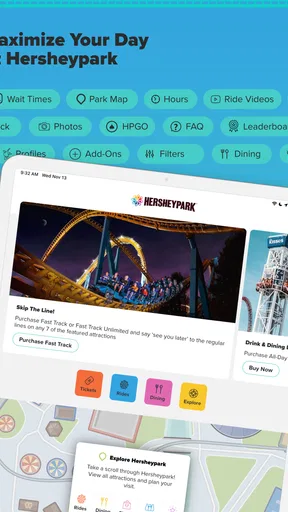
Our Review of Hersheypark
 Analysis by Appyee
Hersheypark is the kind of travel app I would open before leaving home and keep nearby throughout a park day. Developed by Hershey Entertainment and Resorts Company, it is a free Android app in the Travel & Local category, built specifically around a visit to Hersheypark rather than around general trip planning. That narrow focus is its biggest strength: instead of making me sort through broad destination information, it puts the park experience at the center.
I found the app most useful as a companion to a busy day, not as a replacement for advance planning. It can help me orient myself, decide what to do next, and reduce the amount of time spent wandering between attractions. At the same time, its usefulness depends heavily on having a working phone and a dependable connection at the moments when I need current information. That matters in a large, crowded place where battery, signal, and attention are all limited.
How the app fits into a real Hersheypark visit
The official app has been available since May 27, 2011, and its current version is 3.1.46. Those details are less important than the role it plays: I see it as a digital layer over the physical park. The rides, paths, food stops, and decisions still happen around me, while the app helps me make sense of them on the screen.
That distinction is useful because visitors often expect a park app to solve everything. In practice, I would not rely on it to make the day effortless. It cannot remove queues, replace common sense, or guarantee that every plan survives weather, crowds, or a tired group. What it can do is make small decisions easier when everyone is asking, “Where do we go now?”
The app has a 4.7 average from around 9.9 thousand ratings, with roughly 1.5 thousand written reviews and more than 500 thousand installs. Those figures suggest that it has become a familiar tool for many visitors, but I would still judge it by how well it serves my particular travel style. A strong rating does not change the fact that a person who dislikes checking a phone during a day out may find it unnecessary.
Planning before leaving home
My preferred workflow would be to install it before the trip, open it while I have reliable home Wi-Fi, and spend a few minutes learning where the important controls and information are located. Doing this in advance is more comfortable than trying to understand the interface while standing in a crowded entrance area with family members waiting.
I would also use that first session to form a loose plan rather than a rigid timetable. Pick a few priorities, note the general areas where they are located, and leave room for spontaneous choices. A park visit rarely goes exactly as expected, so an app works better when it supports flexible decisions instead of encouraging me to treat the day like a checklist.
One practical advantage of preparing early is that I can notice how much information the app presents before I am under pressure. If I am traveling with children, older relatives, or someone with limited patience for walking, that preview helps me decide which details deserve attention. I can then use the app for quick confirmation rather than repeatedly exploring every screen.
What changes when the connection is weak
Connectivity shapes the experience more than a store summary might suggest. When the app needs current information or has to load a new screen, a slow connection can turn a simple question into a pause. In a park, even a short delay feels longer because I may be blocking a path, holding up a group, or trying to make a decision while people move around me.
I would avoid opening the app for the first time in the middle of a crowded area. Instead, I would check it before moving to a new section, while standing somewhere safe and out of the main flow. This small habit makes the app feel more responsive because I am giving it time to load before the decision becomes urgent.
There is also a social side to network dependence. If one person in a group is responsible for navigation, that phone becomes a shared resource. A low signal or an overloaded device can affect everyone. I recommend agreeing on a simple fallback, such as choosing a recognizable meeting point and remembering the name of the next area, rather than assuming the app will always be available at the exact second it is needed.
I would not treat a screen that loaded earlier as proof that every detail will remain current later. Information connected to a live visit can change, and a visitor should use ordinary judgment when the physical situation disagrees with what appears on the phone. The app is helpful for orientation, but staff instructions and visible park conditions should take priority.
Using it while walking, waiting, and regrouping
The best mobile context for this app is a short planning pause. I would check it while my group is already stopped, after leaving an attraction, or while deciding where to eat. I would not walk with my eyes fixed on the screen. That is safer, less stressful, and usually faster than trying to navigate while moving through a crowd.
A useful technique is to make decisions in batches. Rather than checking the app after every turn, I would choose the next two or three actions: move toward a particular area, stop for food nearby, and then reassess. This reduces repeated screen use and helps the phone battery last longer. It also keeps the group engaged with the park instead of making the day feel like a series of navigation instructions.
For families, the app can serve as a neutral reference when different people want different things. One person may want a thrill ride, another may need a break, and a child may be focused on a specific attraction. Looking at the park as a set of nearby options can make compromise easier. The important point is to use the app to compare realistic choices, not to promise that everyone will get everything immediately.
I also see value in using it during regrouping. If members of a party split up temporarily, the person carrying the phone can check the surroundings and suggest a clear location to meet. Still, I would establish the meeting plan verbally. A phone-based plan is fragile if the battery dies, the signal drops, or someone is distracted.
When the app does not behave as expected
Every travel app needs a recovery plan, and I would prepare one here. If a page takes too long to load, I would stop refreshing it repeatedly. Repeated attempts waste time and can drain the battery without improving the result. I would move to a less crowded spot, wait briefly, and try again when the phone has a better chance of connecting.
If the app closes or becomes unresponsive, my next step would be simple: return to the home screen, reopen it, and avoid making several changes at once. When a group is waiting, it is tempting to keep tapping, but that often makes it harder to understand whether anything actually happened. A calm restart is usually more useful than frantic interaction.
I would also keep the phone charged before entering the park and carry a charging solution if I already use one for long outings. The app may not be the only thing consuming power; photographs, mobile data, bright outdoor screens, and constant communication can matter even more. Treating the phone as a limited resource is part of using the app well.
Most importantly, I would not let a technical problem stop the day. If the app is unavailable, I can still ask staff, follow visible signs, and make a straightforward plan around the area I am already visiting. This is where the official app differs from a complete travel solution: its value is concentrated in convenience and park-specific guidance, while the physical destination remains usable without perfect technology.
Managing data and attention
Because the app is designed for a live destination, I would be thoughtful about mobile data. Before visiting, I would open it on Wi-Fi, update it through the normal app store process if needed, and avoid unnecessary browsing when I am not actively making a decision. I would also close other demanding apps during the day if my phone tends to struggle with heat or battery drain.
That does not mean I would obsess over every megabyte. The more important balance is between data use and practical usefulness. If checking the app saves a long wrong turn or helps my group avoid an unnecessary walk, that small amount of connectivity can be worthwhile. The mistake is leaving the app open and repeatedly refreshing without a clear purpose.
Screen brightness is another overlooked trade-off. Outdoor visibility often encourages a brighter display, but that can shorten battery life. I would raise it when necessary, then lower it during longer pauses. I would also use short sessions: check the information, make the decision, lock the screen, and put the phone away.
Privacy and permissions are worth considering in the same practical way as data consumption. I would read the permission prompts rather than approving everything automatically, and I would only enable a setting when its purpose is clear to me. That habit is useful with any travel app, especially one I may install for a single destination and then use only occasionally.
The age rating is Everyone, which makes the app suitable for a broad audience in terms of content. That does not mean every child should handle the phone independently. A younger visitor may enjoy choosing the next activity, but an adult should remain responsible for navigation, meeting plans, and safe phone use in crowded spaces.
Who will appreciate it most
I would recommend Hersheypark to someone visiting for the first time, especially if the group includes several people with different priorities. First-time visitors have the most to gain from a focused park companion because they are less familiar with the layout and may otherwise spend too much time guessing where to go.
It is also a good fit for visitors who like making flexible plans. I can imagine using it to decide whether the next stop should be a nearby attraction, a meal, or a quieter break. That kind of choice is more realistic than trying to schedule every minute, and it makes the app useful even when the day changes direction.
Parents may appreciate having one central reference point, but I would not describe it as a substitute for preparation. Families should still discuss meeting arrangements, comfort levels, footwear, weather, and phone charging. The app can support those decisions; it cannot make them for you.
On the other hand, I would skip it if I were deliberately taking a phone-free day or if I already knew the park well and preferred following familiar routines. I would also be cautious about depending on it as my only source of information in a group where nobody wants to manage a phone. In that situation, visible signs, staff assistance, and a simple paper or spoken plan may be less distracting.
How it compares with ordinary alternatives
Compared with a general map app, the official app has a clear contextual advantage: it is centered on Hersheypark rather than treating the destination as one point among many. A general map is better for getting to the park, finding nearby places outside it, or planning a wider trip. Once the visit itself becomes the focus, a dedicated tool is more likely to match the questions I am asking.
Compared with searching the web, the app is more convenient for repeated checking. A browser can answer individual questions, but switching between search results, maps, and unrelated pages creates friction. The official app offers a more focused starting point, which matters when I am standing in the park and need to make a quick choice.
Compared with relying entirely on staff, the app gives me more independence for routine decisions. Staff members remain the better option when I need clarification, accessibility guidance, or help with an unusual situation. I would use both: the app for orientation and staff for human judgment.
Compared with going without any digital aid, the app can reduce uncertainty, but it also adds a dependency. I have to manage a device, connection, battery, and attention. That trade-off is worthwhile for me when I am unfamiliar with the park, but less compelling when I want the simplest possible outing.
My overall judgment on connected use
The most reliable way to use this app is as a prepared backup for decisions, not as the single thing holding the day together. I would load it before arriving, learn its basic layout, check it during stationary pauses, and keep a non-digital plan for meeting and navigation. That approach gives me the convenience of a dedicated park tool without turning every delay into a crisis.
The free price removes the main barrier to trying it, and the Everyone rating makes it approachable for a wide range of visitors. The developer’s focus on Hersheypark also gives the app a purpose that general travel tools cannot fully reproduce. Still, the experience is strongest for people who accept that current information may depend on connectivity and who are willing to manage their phone sensibly.
For my own visit, I would install it before traveling rather than waiting until the entrance. I would use it to shape broad routes, compare nearby choices, and regroup efficiently, while keeping my eyes on the surroundings and my expectations flexible. If the connection faltered, I would pause, retry once in a better spot, and continue with staff help or visible information if necessary.
In the end, Hersheypark succeeds when it stays in the background. It should help me spend less time wondering what to do next, not make me stare at a screen all day. If that sounds like the kind of support you want during a park visit, Hersheypark is a sensible free download to prepare in advance. If you want a completely offline, phone-free experience, or a broad travel planner for the surrounding area, I would choose a different approach and treat this app as optional rather than essential.
Verdict
Strengths of Hersheypark
- Official app for park maps, attractions, dining, and entertainment details.
- Useful ride wait-time information helps plan your day more efficiently.
- Provides schedules for shows, parades, and other seasonal activities.
- Can help locate restrooms, shops, restaurants, and guest services.
- Helpful companion for checking park updates before and during your visit.
Limitations of Hersheypark
- Some features may depend on an internet connection and accurate location access.
- Wait times and schedules can change quickly during busy park days.
- The app may use battery and mobile data while tracking your location.
- Information can become less useful outside the Hersheypark operating season.
- Some users may find notifications or promotional content excessive.
Similar Picks in This Category
View All
Google Maps
Google LLC3.4

Google Maps Go
Google LLC4.1

Booking.com: Hotels & Travel
Booking.com Hotels & Vacation Rentals4.8

Google Earth
Google LLC3.8

Skyscanner Flights Hotels Cars
Skyscanner Ltd4.8

trivago: Compare hotel prices
trivago N.V.4.4
Frequently Asked Questions
What is the Hersheypark app used for?
The Hersheypark app is a useful companion for planning and enjoying a visit to Hersheypark in Hershey, Pennsylvania. It can help you explore rides, attractions, shows, dining locations, shops, park information, and directions. Depending on the current version and available features, it may also provide an interactive map, ride details, wait-time information, schedules, and ticket or reservation assistance.
Can I buy Hersheypark tickets through the app?
The app may provide access to Hersheypark ticket information, admission options, promotions, and links or tools for purchasing tickets. Availability can vary by season, event, location, and app version, so it is a good idea to confirm the final price, date restrictions, parking details, and any special terms before completing your purchase. Always use official Hersheypark sources for current ticket policies.
Does the Hersheypark app show ride wait times and attraction information?
One of the most useful reasons to install the app is to check attraction details while planning your day. Depending on current functionality and park operating conditions, it may show ride descriptions, height requirements, accessibility information, operating status, and estimated wait times. These details can change quickly because of weather, maintenance, crowd levels, or temporary closures.
Does the Hersheypark app work without an internet connection?
The app may continue to display some previously loaded information, but features that depend on live data generally require an active internet connection. Maps, wait times, operating updates, schedules, mobile services, and account-related tools may not work reliably offline. Before entering the park, consider reviewing important information, charging your phone, and using available park Wi-Fi or mobile data.
Is the Hersheypark app free, and what devices support it?
The Hersheypark app is generally available as a free download, although using certain park services, purchasing tickets, ordering food, or accessing special experiences may involve additional costs. It is designed for supported Android and iOS devices, but compatibility can change as operating systems are updated. Check the Google Play Store or Apple App Store listing for current requirements and permissions.
